Paper Cards or a Phone Note for Planning a Scene?
Choose paper cards or a phone note for scene planning, keep shot details clear, and carry one reliable sequence into filming without duplicate plans.
The common mistake in scene planning is writing shot ideas in the order they occur to you, then treating that list as the story’s natural order. A phone note can make the plan easy to carry, but it can also hide how a scene’s cause and effect unfold. Paper cards offer a different advantage: you can compare competing versions of a scene without rebuilding the entire list.
Use scene planning to test cause and effect
A scene plan is more than a record of images. It helps you decide what prompts an action, what the viewer learns, and what changes by the end. If someone hears a noise and then looks toward the hallway, the order gives the sound a clear purpose; reverse those moments, and the look may feel unmotivated.
Think of a plan like recipe cards on a counter: the ingredients do not change, but their order can change what you make. For a short video, write down the action that turns the scene, the information the viewer needs, and the ending beat. Then decide which shots earn a place because they make those moments understandable.
This focus keeps planning distinct from drawing a picture of every shot or deciding camera angles in advance. You are arranging story information: what the audience knows, when they know it, and what they expect next.
Paper cards help compare competing versions of a scene
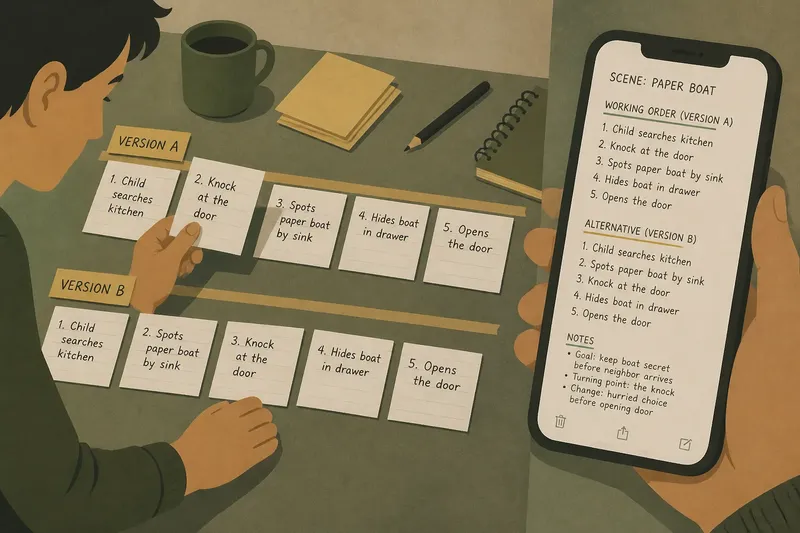
Give each card one story beat, such as “the envelope is missing,” “Mara checks the drawer,” or “the note appears beneath the grocery list.” Put the cards in order on a table, then make a second row for an alternative. You can compare which version makes Mara’s next choice feel understandable without committing to either sequence.
Cards work especially well when the scene has a choice, interruption, or reveal that might land in different places. Keep the text focused on what changes in the story, not a full description of the frame. If two beats communicate the same information, place their cards together and decide whether one can be removed or given a different purpose.
The drawback is that a pile of loose cards can become confusing, especially if you are planning several scenes. Add a short scene name to each card, and mark alternatives clearly. A strip of painter’s tape on a table can hold a sequence in place while you compare it.
A phone note keeps story decisions close at hand
A phone note is useful for recording the current version and carrying it to the filming location. Keep one line per story beat, use short scene labels, and separate alternatives from the chosen order. This makes it easier to check what the character wants and what changes before the scene ends.
A long note can make alternatives hard to compare because you see only part of the sequence at once. After changing an order, read the whole scene again and check that each action still follows from what came before. If the note app makes reordering awkward, write the alternatives as separate, clearly named versions rather than repeatedly editing the same list.
Do not let the note become a script by accident. Dialogue can help when a line causes a change, but polished dialogue is not needed to compare the scene’s order. Keep only the words or details that affect what happens next.
Choose a format based on the decision you need to make
Choose cards when you are weighing two or more story orders, moving a reveal, or deciding whether a beat belongs in the scene. Choose a phone note when you already know the current version and need a portable record of character goals, turning points, and unresolved questions.
Imagine you are planning an invented scene about a child who has misplaced a paper boat before a neighbor arrives. Your starting beats are: the child searches the kitchen; a knock sounds; the child spots the boat beside the sink; the child hides it in a drawer before opening the door. On cards, you try placing the discovery before the knock, then compare the versions: the first order creates a hurried response to the visitor, while the second makes the hiding feel less connected to the arrival. You choose the first order because it gives the knock a visible effect on the child’s decision. In a phone note, you record that version as the working order and keep the alternative under a separate heading, so you can revisit it without confusing the two.
Using both formats can help if each has a clear job. Explore alternatives with cards, then copy the selected story order into one phone note. Mark the cards as a draft or put them away, so you do not carry two competing versions to the filming location.
Check whether the scene’s story order is ready
- Check whether the character’s goal is stated in plain language; if it is, keep it as the scene’s starting point, but if it is vague, rewrite it as a visible action or decision.
- Check whether each beat changes what the character knows or does; if it does, keep it in the sequence, but if it repeats an earlier beat, cut it or give it a new story function.
- Check whether a reaction has a clear cause earlier in the order; if it does, keep the cause before the reaction, but if it does not, move the relevant event earlier or revise the reaction.
- Check whether the reveal arrives before the viewer has enough context; if it does, add or move a setup beat earlier, but if the setup gives too much away, hold back one detail.
- Check whether the ending shows a change from the opening; if it does, keep the contrast, but if nothing has shifted, revise the final decision or remove a beat that does not affect the character.
- Check whether two consecutive beats tell the same part of the story; if they do, combine or remove one, but if each adds a distinct consequence, keep both.
- Check whether an alternative ending is clearly separate from the chosen order; if it is, keep it as a labeled option, but if it is mixed into the sequence, move it under its own heading or onto a separate card.
What do people ask about planning a scene?
Can I change the order of beats in a phone note?
Yes. Move the lines with your note app’s editing tools, or cut and paste them into a new order. Then read the full scene again to catch reactions that no longer have a clear cause.
Are cards useful when a scene has two possible endings?
Yes. Make a separate card for each ending and compare what each one changes about the character’s decision. Keep the unchosen version clearly marked as an alternative so it is not mistaken for part of the current sequence.
What should I write on a scene-planning card?
Write one story beat in a few words: an action, discovery, interruption, or decision. Add a detail only if it changes what the character does or what the viewer understands.
How do I keep a chosen sequence from getting mixed up with a draft?
Choose one working version and label it as current in your note or on the cards. Keep discarded or unchosen versions separate, so an old order does not quietly return to the plan.
Carry one clear story version into filming
Before filming, read the scene in order and ask whether each beat gives the next one a reason to happen. If the character’s choice feels abrupt, add the missing cause or change the order; if the sequence reads clearly, record that version in one place.
For a small home video, reused packaging can hold paper cards, while a phone note can carry the selected beats to the kitchen or hallway where you will film. Keep the plan focused on the character’s changing situation. That gives you room to adapt the shots on location without losing the story decision you made.